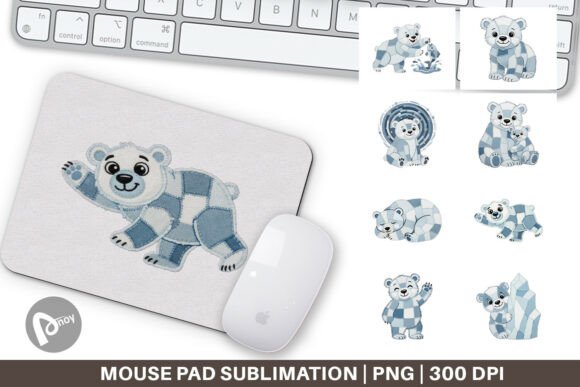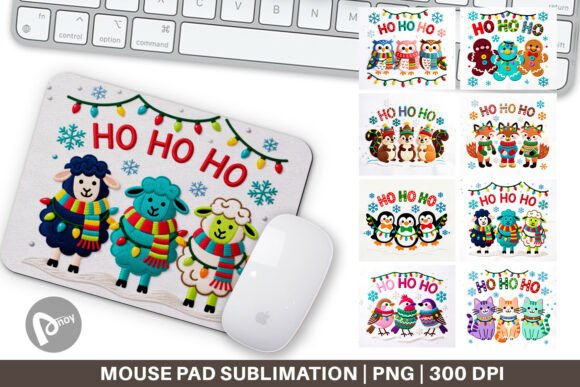
Faux Embroidery Holiday Animal Mouse Pad: A Practical Design Asset for Creative Workspaces
Digital design bundles that simulate the texture and depth of stitched embroidery offer a smart shortcut for anyone looking to create professional-looking mouse pads without investing in complex embroidery software or machinery. The Faux Embroidery Holiday Animal Mouse Pad collection provides exactly that: a set of high-resolution PNG files featuring seasonal animal motifs surrounded by Christmas-themed text, all rendered with convincing thread-like textures, shading, and dimensional effects. Because the heavy lifting is already done in the design itself, you can move straight from download to production while still achieving a tactile, handcrafted look that appeals to both retail buyers and personal users.
What the Bundle Actually Contains and How It Fits Into Production Workflows
The download includes eight individual PNG files, each sized at 9.5 by 8.1 inches and set at 300 dpi. That resolution and canvas size align directly with standard sublimation mouse pad blanks, which means you won’t need to upscale or reconfigure the artwork before printing. Every design features an animal—such as a deer, bear, fox, or rabbit—styled to appear as if it were stitched onto fabric, complete with layered thread textures, faux embroidery shadows, and integrated holiday verbiage. Because the files are PNG format, they maintain transparency where needed and embed cleanly into most graphic design or print production software.
For anyone running a product-based side business, managing seasonal inventory, or simply personalizing workspace accessories, these files occupy a specific, early-stage position in the creative production chain. They serve as ready-made art that eliminates the need for illustration or typography work. Your job becomes focused on output: selecting substrates, calibrating print settings, pressing, and finishing. That shift reduces time-to-finished-product significantly, which is especially useful in the weeks leading up to the holidays when turnaround speed matters.
Planning, Preparation, and Pre-Production Steps
Before you send a single design to your printer, a few preparatory actions help maintain consistency and avoid wasted materials. Start by confirming your mouse pad blank dimensions against the 9.5×8.1-inch file size. Most rectangular neoprene blanks fall within that range, but exact measurements can vary by a few millimeters. A quick check lets you decide whether to resize, trim, or adjust margins. Since the design uses a faux embroidery effect that relies on precise drop shadows and highlight layers, aggressive scaling can muddy those details. Stick as close to native resolution as possible.
Color calibration between your monitor and sublimation printer also matters. The faux embroidery stitching often includes subtle tonal variations—lighter top threads, darker underlay, and soft gradients—that can disappear if your heat press temperature or pressure bleeds them out. Test on a scrap piece of fabric or a low-cost blank first. Use the same ICC profile you’d rely on for any photographic print to keep those thread-like contours distinct. If you’re new to sublimation, note that white or very light-colored substrates give the best canvas for these designs; the faux embroidery depends on contrast against a bright background to read as raised stitching.
Organizing Files and Streamlining Batch Processing
Eight designs give you enough variety to offer a small product line or refresh your desk setup through the season. To keep everything manageable, create a folder structure that separates the original PNGs, any mockup images, and print-ready files. Label each design clearly with the animal name or a brief descriptor—this saves time when you need to reprint a specific design later. If you use design software like Adobe Photoshop or Affinity Photo, consider placing each PNG into a template that includes your printer’s correct bleed and alignment marks. Doing this once for all eight files ensures every printed sheet aligns properly on the heat press, reducing crooked placements that waste costly blanks.
For those making multiple mouse pads in one session, group your workflow by task: print all designs first, then move to the pressing station. Keep a log of press time, temperature, and pressure settings for each blank type you use. Over time, this record turns into a reliable reference that removes guesswork from repeat production.
Using the Mouse Pad Designs Before, During, and After Core Projects
These faux embroidery designs don’t just sit at the end of a production line; they can play useful supporting roles at different stages of your creative or professional schedule. Before a busy holiday selling season, they help you test new equipment or fine-tune your sublimation process without the added pressure of designing from scratch. Using a ready-made file as a calibration piece reduces variables; if the print looks off, you know the issue lies in the print settings, not the artwork.
During a project, such as preparing a set of coordinated office gifts or assembling welcome bags for a company event, these mouse pads function as a quick-finish item that rounds out a themed collection. Because the files are digital, you can print on demand rather than overcommit to inventory. Print one or two at a time as needed, keeping storage minimal. After the project ends, the remaining designs can transition into year-round use—swap the holiday text for a neutral version (if file editing rights allow), or simply reprint a favorite animal for everyday desk use. Even without modifications, many of the animal illustrations carry a winter or woodsy aesthetic that doesn’t feel aggressively Christmas-specific, so they remain pleasant well into January and February.
Integration With Other Tools, Platforms, and Materials
The PNG format integrates seamlessly with a range of production methods beyond basic sublimation. These same files can be printed onto adhesive vinyl, cut to shape, and applied to flat surfaces to create custom coasters, laptop covers, or drawer fronts. In a hybrid workflow, you might import the design into a cutting machine’s software, trace the faux embroidery text, and add a physical vinyl overlay that enhances the textured illusion—though the pre-made stitch effect already does convincing work on its own.
For those selling on platforms like Etsy, Shopify, or Amazon Handmade, these designs fit directly into product listing workflows. You can present the final pressed mouse pad alongside a digital mockup of the file, giving customers a clear before-and-after view. The unique faux embroidery aesthetic sets your listing apart from standard flat-print mouse pads, often justifying a higher price point. When customers search for “handmade look mouse pad” or “stitched animal desk mat,” your product has a better chance of appearing because the design itself delivers on that visual promise.
Collaborators also benefit from the straightforward file structure. If you outsource printing to a third-party supplier, simply send the PNG along with precise dimensions and your preferred blank specifications. There’s no layered source file to manage or font licensing to worry about; the art is flattened and print-ready, which minimises back-and-forth communication.
Practical Implementation Tips for Consistency and Quality Control
Quality across the eight designs within the bundle remains high, but variations in animal fur texture and text placement mean you should inspect each file individually before printing. Look at them at actual print size on your screen. Check that the faux embroidery drop shadows don’t clip or appear too harsh against the intended background color of your substrate. A quick spot check avoids the disappointment of a fuzzy fox face or unreadable greeting.
When pressing, use a heat-resistant tape to hold the design against the blank. The 9.5×8.1 inch canvas often covers the entire mouse pad surface, so even a slight shift during pressing can cause white edges to appear. A consistent taping routine removes that variable. Also, allow the pressed mouse pad to cool flat under a weight to prevent curling; neoprene bases are sturdy but can warp if removed too quickly from heat.
If you plan to offer these mouse pads for sale, consider including a small care instruction card with each order. Remind buyers to hand wash with mild soap and avoid abrasive scrubbing, which helps preserve the faux embroidery look over months of daily use. This small step reduces returns and improves customer satisfaction scores—important for marketplace algorithms.
Productivity and Comfort on Your Own Desk
Beyond the production angle, the finished mouse pad serves a direct functional role in your daily workspace. A smooth yet cushioned surface reduces wrist strain during extended computer sessions, and a personally meaningful design—holiday animals, in this case—can subtly improve mood and focus. Many people underestimate the psychological impact of desk aesthetics, but swapping a plain black pad for one with a carefully chosen seasonal theme can make the workspace feel maintained and intentional. That small change often correlates with a greater willingness to tackle detailed tasks, whether you’re editing spreadsheets, doing graphic design, or managing back-end website updates.
Because the design is printed rather than actually stitched, the surface remains flat and easy to clean. No threads snag or come loose, and the mouse glides without interference. For anyone who likes to rotate office decor with the seasons, keeping a small library of printed mouse pads (or simply having the files ready to press a fresh one) makes refreshing your environment quick and cost-effective.
Long-Term Use and Repurposing the Digital Asset
One of the strongest practical arguments for a digital design bundle like this is its indefinite reusability. The 300 dpi PNGs do not degrade, and you can return to them year after year. That longevity changes the way you plan holiday inventory. Instead of rushing to order stock or hire a designer each autumn, you already own the core artwork. You might experiment with new blank shapes—round mouse pads, extended desk mats, or even wrist rests—using the same designs cropped or adjusted. The faux embroidery animal elements can also be extracted and used independently for other items like magnets, ornaments, or sublimation apparel if your license allows for slight resizing and product diversification.
This repurposing angle turns the initial purchase into a multi-year asset. Many small business owners and hobbyists find that having a bank of seasonal yet timeless designs reduces the mental load of constant content creation. The faux embroidery style, in particular, remains on-trend because it mimics the warmth of handmade goods without the time commitment—a factor that resonates strongly with buyers seeking gifts that feel personal but don’t carry bespoke pricing.
Decision Factors When Choosing This Design Bundle
Before adding these files to your resource library, assess a few practical points. First, confirm that your production equipment can handle a 9.5×8.1 inch print area; standard A4 sublimation paper is slightly larger than that, but some smaller home printers may require patience with alignment. Second, consider whether your customer base (or your own taste) aligns with a rustic, craft-style aesthetic. The faux embroidery look favors warm, traditional holiday themes—it works beautifully for cabin-style decor, boutique gift shops, and cozy office setups, but it may not suit ultra-minimalist or corporate environments unless intentionally paired as a seasonal accent.
Third, think about the number of variations you need. Eight different animal designs offer enough range to create a cohesive collection without overwhelming buyers or cluttering your own desk rotation. This quantity also makes it easy to bundle physically—sell a “holiday desk trio” of three different mouse pads or give a set as a festive team gift. Finally, check that the text elements meet your language or phrasing preferences; the designs come with preset holiday messages, so if you need alternative wording, you would need to obtain the appropriate commercial rights or use the files purely as-is.
Integrating the Faux Embroidery Holiday Animal Mouse Pad bundle into your workflow is largely about recognizing it as a finished design asset that shifts your focus from creation to execution. By centralizing preparation steps, batch processing strategies, and quality checks around these ready-to-print files, you can produce a polished final product that improves workspace comfort and carries the appeal of handcrafted detail—without the usual time investment. Whether you plan to sell, gift, or simply beautify your own desk, the path from digital download to usable mouse pad is direct, repeatable, and designed to support consistent results across multiple print runs.